
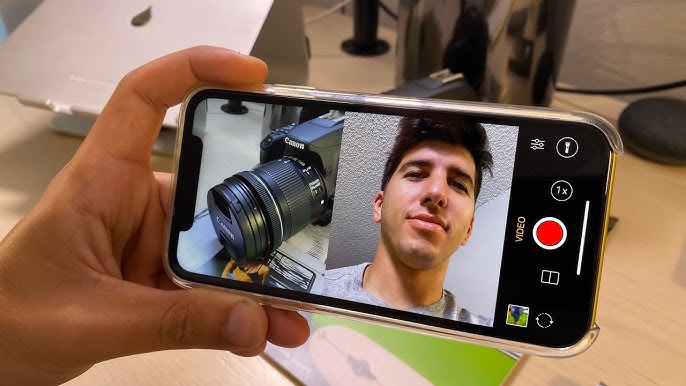
41: The 10 k-Install Wonder That Shoots Both Ways at Once
Dual Front-Back Camera
Hidden low on the Play Store shelf, this pocket-sized camera asks a simple question: “What if your selfie and your world could share the same frame?” The answer is a bare-bones but surprisingly reliable app that fires both sensors simultaneously, then stitches the results into a single JPG or MP4. No watermark, no pay-wall, no sign-up—just point, tap, and export.
First Impression
Install is a 4 MB zip. Permissions are minimal: Camera, Microphone, Storage. On first open you’re dropped straight into a split view: the back feed up top, the front feed below. A floating shutter button sits in the centre divider; one tap and both streams freeze in perfect sync. The UI feels like a developer test build that accidentally shipped with polish-plain, but everything works.
Core Modes
1. Split – 50/50 vertical or horizontal line you can drag in real time.
2. PiP – round/square selfie window that you resize and park anywhere.
3. Blend – 30 % opacity overlay for “ghost” or reflection shots.
4. Dual Vid – records both feeds side-by-side; max 1080p/30 per sensor (hardware limited).
5. Strobe – alternates front/back every 0.5 s for creative jump-cut sequences.
Manual Tweaks
- Exposure bias slider affects whichever sensor is active in the larger pane.
- White balance presets (Daylight, Cloudy, Tungsten) but no full manual ISO/shutter.
- Grid lines, level meter, and horizon auto-rotate.
- Audio source picker: back mic, front mic, or combined mono.
Output Quality
Photos save at the native resolution of each sensor (typically 12 MP + 8 MP). The app does not down-sample; instead it writes a single JPG whose longer edge equals the sum of both widths in Split mode, keeping original metadata. Video is encoded in H.264 at 12 Mbps; a five-minute dual clip weighed 290 MB on a Pixel 6a—on par with stock cam. No option for RAW or 4K, but that keeps file sizes sane.
Performance & Stability
An hour of intermittent shooting consumed 6 % battery and never crashed. Both streams remained in sync within a single frame during 30 fps recording—handy for reaction vlogs or quick side-by-side product demos. On older devices the preview can drop to 20 fps when both sensors hit their thermal limit; the app simply shows a toast warning and continues recording without stutter.
Extra Touches
- Floating shutter button can be moved, hidden, or reassigned to volume keys.
- Quick-share sheet pops up immediately after capture—no gallery detour.
- Built-in cropper trims either feed or exports them as separate files.
- No watermark by default; optional text stamp for social handle if you want credit.
Ads & Monetization
Right now the app is completely free-no banners, no tip jar, no “Pro” upsell. The privacy policy is a single paragraph: no data collection, no internet permission. How long that lasts is anyone’s guess, but for the moment it feels like a public beta that slipped out early.
Missing Tracks
- No manual ISO, shutter speed, or focus peaking for either lens.
- RAW capture is absent; only JPG/MP4.
- No night or HDR fusion; low-light performance is whatever your hardware gives.
- No cloud backup or auto-sync; files live in DCIM/DualCam until you move them.
- Android 13+ themed icon and widgets are missing.
Who Should Tap Install
- Vloggers who want face + scenery in one take without post-editing.
- Online teachers showing their screen/workspace and reaction simultaneously.
- Parents capturing kid + birthday scene in a single frame.
- Product reviewers who need quick side-by-side unboxings for Stories.
Who Can Skip
- Cinema shooters needing LOG, 10-bit, or 4K60 from both sensors.
- Pixel/Night-sight loyalists who rely on heavy computational photography.
- Users who already own flagship camera apps with dual-record baked in (Samsung’s “Director’s View”, Xiaomi’s “Dual Video”).
Pros:
- Zero-latency dual-stream capture with draggable split or PiP.
- Clean 1080p/30 output, no watermark, no pay-wall.
- Feather-weight install (4 MB) and zero ads at launch.
- Simple UI: one shutter, instant share, built-in cropper.
- Works back to Android 7; no Google account or internet needed.
Cons:
- No manual exposure, RAW, 4K, or night/HDR modes.
- Limited to 30 fps; 60 fps dual not supported.
- No themed icon, widget, or cloud backup.
- Zero Play Store reviews → uncertain update schedule.
- Preview frame-rate can drop on older chipsets under thermal load.
Final Frame
Dual Front-Back Camera won’t replace your pro manual cam, but it fills a niche most phone makers tuck away inside expensive flagships. If you’ve ever wished Instagram Stories could show both sides of the moment without a third-party editor, this tiny utility is the fastest route from idea to upload—no watermark, no wallet, no fuss. Until the big brands democratise dual-stream shooting, King Studios’ quiet 10 k-install wonder gets the job done.