
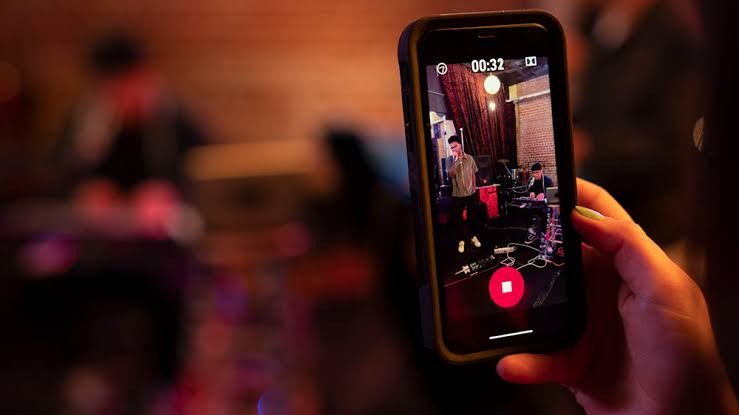
102: Pro Audio, Sans the Studio
Dolby On: Record Audio & Music
Dolby On by Dolby Laboratories Inc. is a mobile recording application that brings the company's decades of professional audio engineering experience to Android devices. With over five million downloads and a four point six star rating across twenty-five thousand user reviews, it has carved out a distinctive position in a category crowded with simple voice recorders and complicated digital audio workstations. The app's premise is straightforward: enable anyone to capture music, voice, and ambient sound with studio-grade processing applied automatically, eliminating the technical barriers that traditionally separate amateur recordings from professional results. It does this through real-time audio processing, intelligent preset selection, and a capture workflow designed to feel as natural as opening a camera app.
The app is positioned for musicians capturing song ideas, podcasters recording interviews, content creators producing social media audio, and anyone who has wanted better sound quality from their phone without learning audio engineering. It is not a full DAW replacement, not a multitrack editing suite, and not a tool for engineers who require granular control over every parameter. It is an opinionated recorder that applies Dolby's professional processing decisions automatically, letting users focus on performance rather than technique.
Core Capabilities
The app's primary function is audio capture with automatic Dolby processing. When users open the app, they are presented with a single large record button and a selection of recording modes. The available presets include Music, Voice, Voice + Music, Stereo, and Instrument, each tuned with specific processing chains optimized for the corresponding source material. Users select the appropriate mode, press record, and the app handles the rest: noise reduction, dynamic equalization, de-essing, stereo widening, and loudness normalization are all applied in real time without user intervention.
The noise reduction is particularly aggressive and effective. Background hum, air conditioning noise, wind, and ambient room sound are suppressed while preserving the clarity of the intended source. For users recording in bedrooms, coffee shops, or outdoor environments where acoustic treatment is unavailable, this automatic cleanup transforms unusable raw recordings into polished results.
Dynamic EQ adjusts the frequency balance throughout the recording, ensuring that vocals remain intelligible even when the performer moves closer to or further from the microphone. De-essing reduces harsh sibilance in vocal recordings without requiring users to understand what sibilance is or how to control it. Stereo widening creates a sense of space and dimension that flat smartphone recordings typically lack.
The app captures audio in uncompressed WAV format, preserving the full fidelity of the processed output. This is unusual in the mobile recording category, where many apps default to compressed formats to save storage. The WAV capture means files are larger, but quality is preserved for later editing, mixing, or distribution.
Post-capture editing is intentionally minimal. Users can trim recordings, adjust the overall volume, and apply a finishing preset, but the app does not offer multitrack editing, plugin support, or detailed parameter control. This restraint is deliberate, reflecting Dolby's philosophy that the most important audio decisions should be made automatically by the software, not manually by the user.
Sharing and export options include direct posting to social platforms, saving to device storage, or sharing through standard Android sharing intents. The app integrates with Dolby's optional premium content store, where users can purchase sound packs, beats, and additional features, though the core recording functionality remains free.
What It Does Well
The app's greatest strength is the quality of its automatic processing. Dolby's engineering expertise, honed over decades in cinema audio, music production, and broadcast, is distilled into algorithms that produce consistently excellent results without user input. The four point six star rating reflects genuine satisfaction among users who would otherwise need expensive microphones, acoustic treatment, and audio engineering knowledge to achieve comparable results.
The user experience is refreshingly direct. Opening the app, selecting a mode, and recording takes seconds. There are no menus to navigate, no settings to configure, no technical jargon to understand. Users who find traditional audio software intimidating can produce professional-sounding recordings on their first attempt.
The presets are genuinely effective. Switching between Music, Voice, and Voice + Music modes produces noticeably different processing characteristics appropriate to each source. The Music mode applies gentle compression and stereo enhancement, while the Voice mode prioritizes clarity and intelligibility through more aggressive dynamic processing.
The WAV capture format is a meaningful differentiator. While other apps sacrifice audio quality for file size, Dolby On preserves the full resolution of the processed signal. This matters for musicians who plan to mix their recordings later, podcasters who want broadcast-quality masters, and anyone who values future flexibility over immediate storage savings.
The noise reduction alone justifies the app for many users. The ability to record in noisy environments without expensive soundproofing equipment democratizes audio production for people who cannot afford professional recording conditions.
The interface design reflects modern mobile sensibilities. Large touch targets, clear visual feedback during recording, and a minimalist aesthetic make the app feel like a polished consumer product rather than a scaled-down professional tool. For users who appreciate thoughtful design, the app delivers.
The free price point with no required subscription makes the core functionality accessible to everyone. The optional premium content store exists for users who want additional features, but the recording capability that most users need is not locked behind a paywall.
Limitations and Concerns
The most significant limitation is the absence of multitrack recording. Users cannot record multiple sources simultaneously, layer instruments, or build complex arrangements within the app. For musicians wanting to capture a full band performance, a podcast with multiple hosts, or any production requiring more than a single stereo feed, the app falls short of professional needs.
The editing capabilities are minimal by design. Users can trim and adjust volume, but cannot EQ individual tracks, apply effects to specific sections, or perform detailed mix adjustments. Recordings that need significant post-production work require export to a dedicated DAW, adding friction to the workflow.
The premium content store has drawn criticism from users who find the in-app purchase prompts distracting. While the core functionality is free, the app frequently surfaces offers for paid sound packs and features, creating a monetization layer that some users experience as pushy rather than helpful.
The file sizes produced by WAV capture are substantial. A typical song recording can occupy hundreds of megabytes, quickly consuming device storage. Users with limited phone storage may find the app impractical for extended recording sessions without external storage solutions.
The processing, while excellent, is opinionated. Users who want to apply their own EQ curves, compression settings, or effects chains cannot override Dolby's automatic decisions. The app assumes its processing is always preferable, an assumption that holds for most users most of the time but frustrates those with specific creative intentions.
The Android version has historically lagged behind the iOS version in feature updates. While the gap has narrowed, some features and improvements have appeared on iOS first, leaving Android users waiting for parity. This platform disparity is common but disappointing for users who have chosen Android specifically for its openness.
The app requires relatively modern hardware for optimal performance. Older or budget Android devices may struggle with the real-time processing, producing audio dropouts, latency, or reduced processing quality. Users on flagship devices from the past few years will have the best experience.
The lack of direct integration with cloud storage services is a notable omission. Users cannot automatically back up recordings to Google Drive, Dropbox, or similar services from within the app. Manual file management is required, adding administrative overhead to the workflow.
The Music preset's stereo widening can produce phase issues when recordings are later mixed with other sources. The aggressive processing that makes solo recordings sound impressive can create problems in multitrack contexts, requiring users to disable certain processing for production use.
Competitive Positioning
The mobile recording app category includes a wide spectrum of options, from simple voice recorders to professional field recording tools. Dolby On occupies a distinctive middle ground, offering significantly better automatic processing than basic recorders while remaining far simpler than full DAW applications.
Against simple voice recorders like the default Android recorder or apps like ASR Voice Recorder, Dolby On's processing quality is dramatically superior. The automatic noise reduction, dynamic EQ, and stereo enhancement produce results that basic recorders cannot approach, justifying the app for users who care about audio quality.
Against field recording apps like RecForge II or Field Recorder, Dolby On trades flexibility for simplicity. Field recording apps offer higher sample rates, more format options, and manual control over gain and processing, but require users to understand these settings. Dolby On's automatic approach is preferable for users who want results without technical decisions.
Against professional mobile DAWs like BandLab, FL Studio Mobile, or Cubasis, Dolby On is not a direct competitor. These apps offer multitrack editing, plugin support, and detailed control that Dolby On deliberately omits. The apps serve different audiences: professional musicians and producers versus casual creators who want polished results quickly.
Against other automatic processing apps like Spire Recorder or Voloco, Dolby On benefits from Dolby's brand recognition and engineering pedigree. The processing quality is consistently among the best in the automatic category, and the app's stability and polish reflect the resources of a major audio technology company.
Against hardware solutions like dedicated portable recorders from Zoom, Tascam, or Sony, no app can fully match the audio quality of dedicated hardware with proper microphones and preamps. However, Dolby On's software processing can elevate phone recordings to a level that approaches entry-level dedicated recorders, an impressive achievement for a free app.
Target Audience
The app is ideally suited for musicians capturing song ideas and demos on the go, podcasters recording interviews or solo episodes in non-studio environments, content creators producing audio for social media platforms, voice-over artists needing quick auditions, and anyone who wants better sound quality from their phone without investing in external microphones or learning audio engineering.
It is also valuable for students recording lectures, journalists conducting interviews, and field researchers capturing ambient sound for later analysis. The automatic processing produces cleaner, more intelligible recordings than standard phone recording, useful in any context where audio quality matters.
It is not recommended for professional music production requiring multitrack capabilities, users needing detailed control over every audio parameter, or anyone seeking a permanent replacement for dedicated recording hardware. The app is a tool for a specific use case, and using it outside that case produces disappointing results.
Verdict
Dolby On is a focused, well-executed recording app that brings professional audio processing to users who would never open a traditional DAW. The five million download scale and four point six star rating reflect genuine satisfaction with a tool that does its specific job exceptionally well, making high-quality audio capture accessible to anyone with an Android phone.
The app is not a replacement for professional recording equipment or full-featured audio production software. It is a smartphone tool that applies decades of Dolby engineering expertise automatically, producing results that would otherwise require expensive hardware, acoustic treatment, and technical knowledge to achieve.
For casual creators, musicians capturing ideas, podcasters recording in imperfect environments, and anyone who wants better sound from their phone, the app is excellent and recommended without reservation. The free price point, automatic processing, and consistent quality make it one of the best values in the mobile audio category.
For users with more demanding needs, the app is a useful complement to a more comprehensive production setup rather than a replacement. Capture ideas and quick sessions with Dolby On, then move serious projects to proper DAWs where multitrack editing and detailed control become available.
Rating: Eight out of ten. Outstanding automatic audio processing that delivers professional-sounding recordings with zero technical knowledge required, held back by the absence of multitrack capabilities, opinionated processing that cannot be overridden, and a premium content store that occasionally distracts from the core experience. Recommended enthusiastically for casual creators, content producers, and anyone who wants studio-quality sound from their phone without the studio.