
25: Your Handy Audio Tool in Your Pocket
Video to MP3 - Video to Audio
Get it on Playstore Get it on the App Store
In this highly digital, media-rich environment, we are always finding ourselves in situations where we require just the audio of a video file. Maybe you recorded a lecture or conference presentation on video but now want just the audio for easy listening while commuting. Perhaps you have recorded a musical performance and want to extract the audio track from it. Or maybe you need a particular audio clip out of that long recording for something like a project or ringtone.
Traditionally, in order to get the audio from videos, it required desktop software, technical knowledge, and time-consuming processes. Video to Audio-MP3 Cutter totally simplifies this by placing professional-level audio extraction and editing capabilities on your smartphone. With over 50 million downloads and a stellar 4.8-star rating from over 670,000+ reviews, this app has become one of the go-to means for millions to achieve fast, reliable manipulations of audio.
What does it do?
Video to Audio - MP3 Cutter is a utility designed in a pretty constructive way, as it basically combines two necessary functions in one. First, it extracts audio tracks from video files and converts them into various audio formats like MP3, AAC, and others. Second, it performs precise audio editing such as cutting, trimming, and custom creation from longer recordings.
The app works with videos, whether taken from your gallery, recorded with a camera, downloaded, or transferred from other sources. After processing, the audio can be saved, shared, used to set ringtones, or further edited within the app.
Core Features
Video to Audio Conversion: The core functionality works just great: you select a video, choose your desired audio format and quality, and the app rapidly extracts the audio track. The conversion maintains the quality of the audio but with much smaller file sizes compared to the original video.
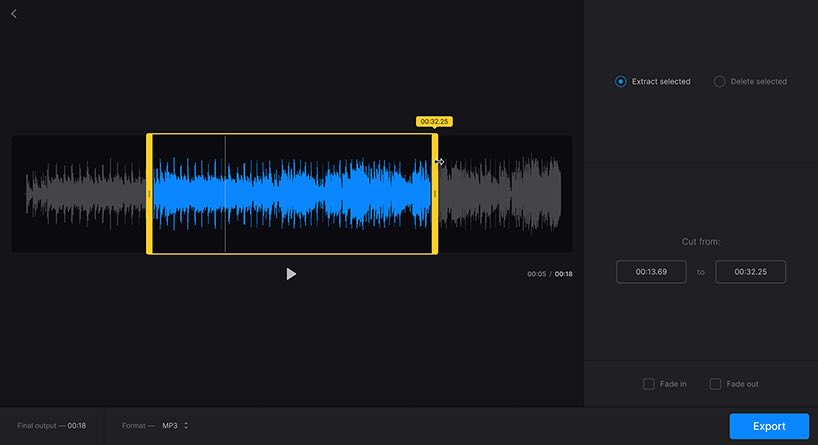
Audio Cutter/Trimmer: Precision editing allows you to select the exact starting and ending points of audio clips. You can easily identify the precise section you need with visual waveform displays, while timeline controls allow frame-accurate cuts. This is really important in creating ringtones, notification sounds, or extracting particular sections from recordings.
Support for Multiple Formats: This application supports a wide range of video formats, including MP4, AVI, MKV, and MOV, and provides various audio output options to suit diverse needs and device compatibility.
Batch Processing: Users can queue multiple videos for conversion, processing them sequentially without manual intervention for each file—a time-saver when handling numerous files.
Audio Merging: Merge several audio files into single tracks. This helps in creating compilation playlists, mashups, or continuous playback sequences.
Quality Selection: Choose audio bitrate and quality settings, balancing file size against audio fidelity based on your specific needs.
User Experience
It supports an intuitive interface for complex audio manipulations even for those who aren't tech-savvy. The workflow is simple: select your video or audio, select the operation to perform-Extract, Cut, Merge-adjust settings, and process. Visual feedback through waveforms and timeline displays help users understand exactly what they are editing.
The processing speeds are impressive, with most operations completing in seconds, not minutes. The app runs efficiently, without noticeable battery drain or device heating, which suggests that the code is rather well optimized.
Practical Applications
Video to Audio - MP3 Cutter serves countless real-world needs:
Educational Content Creation: Students extract audio from recorded lectures for convenience in study while commuting or exercising. Podcast Creation: Extract audio from video interviews or presentations for podcast episodes. Music Extraction: Save audio from video performances for practice or archival purposes as a musician. Creating Ringtones and Notification Sounds: Create personalized ringtones and notification sounds from your favorite songs or memorable recordings. Language Learning: Extract audio from video lessons for listening practice repeatedly. Professional Use: Transcription and referencing by journalists, researchers, and other professionals require them to extract audio from video interviews or meetings.
Advertising and Monetization
Like most free utility applications, Video to Audio - MP3 Cutter contains ads. However, the implementation remains fairly reasonable considering more aggressive apps. Ads pop up between operations but don't interfere with the workflow too much or make basic functionality frustrating.
A premium version strips ads and adds features for more frequent users or those who want ad-free applications. The prices are modest, reflecting value for the functionality provided.
Pros:
- Large user community with 50M+ downloads testifying to reliability.
- Excellent ratings of 4.8 stars from over 670K reviews
- Fast operation speed, with completions in seconds.
- Intuitive interface for any level of computer skills
- Multiple format support for broad compatibility
- Precision editing tools with visual waveform displays
- Batch processing, saving time on multiple files
- Audio merging to make compilations
- A lightweight application with minimum resource usage.
- Reasonable ad implementation not destroying usability
- Free core functionality that meets most user needs
Cons:
- Advertisements present in the free version
- Advanced capabilities limited compared to software on desktops
- Basic audio effects without professional mixing tools
- Quality loss possible depending on format choices
- Storage requirements for the processed files
- No cloud integration for direct online file access
- Premium features locked behind paywall for power users
Final Verdict
Video to Audio - MP3 Cutter is very good at its intended purpose: providing fast, reliable audio extraction and basic editing from a mobile device. That the app has been downloaded more than 50 million times and has a rating of 4.8 stars testifies to user satisfaction with functionality that works steadily and effectively. It does provide excellent value for students, content creators, and professionals who need to occasionally extract and edit audio. The features all come together in this one package, with video-to-audio conversion and audio cutting tools complementing each other perfectly, while the intuitive interface makes complex operations accessible to everyone. It offers a no-nonsense free version with decent functionality for casual users and a reasonably priced premium version for heavy users without ads. Whatever the case, Video to Audio - MP3 Cutter is a very useful and efficient tool that should be considered among the must-have smartphone utilities. Rating: 4.5/5 - An exceptional utility application that does its job well and effectively; strong user ratings further confirm its quality and usefulness for millions of users around the world. Highly recommended for anyone who needs mobile audio extracting and editing possibilities.